
SHAZAM TREASURE
Learn Shazam to boost demographics of TREASURE' songs across the globe that will help Treasure's popularity on Radio/Airplay worldwide!

INTRODUCTION TO SHAZAM

What Is Shazam?
Shazam is a phone app that uses song recognition technology to detect and recognise a song that is playing remotely. Say you hear a song playing on radio or TV that you enjoyed, but don’t know the artist or song title. You can open the Shazam app, tap, and hold your phone close to the radio for about 10 seconds. Voila (or in this case Shazam), you have the name of the song and which artist it is by.
How Does Shazam Work?
The Shazam music finder app allows the user to easily find out the details to a song that is playing through a process aptly named ‘Shazam’. Being the first of its kind, the app gained popularity for its unique ability. Users quickly adopted the app’s name in phrases such as ‘I Shazamed the song” to indicate usage of the app.
Shazam app provides great data to determine or predict which song is popular or will be a hit. Therefore, Shazam data could be used by streaming platforms to determine playlistings, by event planners to determine locations and which artists to invite, by music labels to determine marketing strategies, or by radio stations to decide what songs to play.
In the US, radio plays contribute 30~40% to Billboard HOT 100 chart, and Shazam is one of the many factors (e.g., streaming, sales, Shazams, media engagements, music professional critiques, audience impressions, etc.) that radio stations would use to decide which song they would play.
Therefore, to boost TREASURE songs popularity in your region and to the rest of the world, LETS SHAZAM TREASURE SONGS!
Treasure Makers around the world can join! Come on let's Shazam all Treasure Songs!
You can download Shazam app here.
DOWNLOAD SHAZAM APP
1. DOWNLOAD SHAZAM APP ON YOUR ANDROID AND IOS DEVICES
Shazam app is completely free. It is available on:
•Android devices – Android phones, Android tablets (not available on PC)
•iOS devices – iPhone, iPad, Mac

1. How to Shazam a song for once?
It's easy! Only takes less than 30 seconds!
✓ First, download Shazam app, and make sure the microphone access is enabled for Shazam app in device Settings.
✓ Play any TREASURE song you want to Shazam from anywhere you like (e.g., Spotify, Apple Music, Youtube Music, your car stereo, or CD player in your home, etc.); just make sure your Shazam app (your device) can “hear” the song.
✓ Open the Shazam app and tap the Shazam button.
✓ Shazam will "listen to" the song and identify it in a few seconds.
ADDITIONAL INFORMATIONS
✓ Total Shazam counts are no longer updated frequently in seconds. Instead, the update interval is about 30~60 minutes.
✓ Although it's optional, we strongly encourage turning on the LOCATION permission for Shazam app as it will show your local music industry about TREASURE'S song popularity in your region.
✓ If LOCATION permission is turned on, your Shazam will contribute to both your local Shazam chart as well as Global chart. If it's disabled, your Shazam will only contribute to Global chart.
HOW AUTO SHAZAM WORKS?
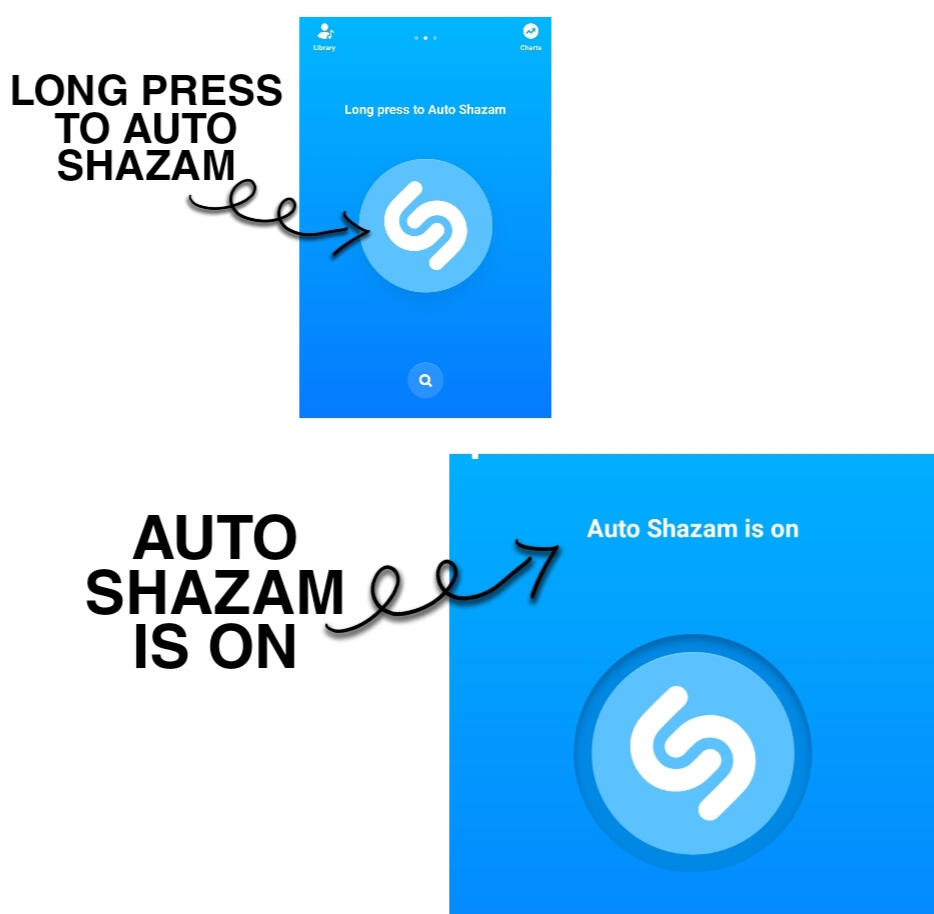
✓ By turning AUTO SHAZAM ON, shazam will directly listen to any song that your phone could here anywhere within or outside your phones' system like on Radio, Television, YouTube, Spotify, Facebook, etc.,
HOW AUTO SHAZAM HELPS?
✓ Let's say for example your playing a playlist of TREASURE SONGS, using AUTO SHAZAM, you no longer have to Shazam manually the songs you are playing or listening to.
HOW TO TURN AUTO SHAZAM ON ?
✓ Simply long press the SHAZAM button. Yes, that's it!
LET'S SHAZAM TREASURE SONGS RIGHT NOW TO BOOST TRESSURE'S DEMOGRAPHICS ON AIRPLAY/RADIO PLAYS!
How to Shazam the same song for multiple times?
• Android Devices
1. Using Android devices, you can Shazam the same song as many times as you want, if you always CLEAR DATA after EVERY Shazam.
2. For Android, you do NOT need to log in at all. Just keep doing Shazam → CLEAR DATA → Shazam → CLEAR DATA → Shazam → CLEAR DATA...... (*There is also no need to Shazam other songs in between, although you certainly can.) If you fail to CLEAR DATA, your Shazams on the same song will only be counted once per 24 hours. So please always CLEAR DATA!
• iOS Devices
1. Most iOS devices can now only add 1 Shazam per 24 hours for the same song using Shazam app (i.e., even if you Shazam many times, only one Shazam will be counted towards total number), as there is no longer a way to CLEAR DATA on the iOS devices (i.e., the previous log in/out & REMOVE method on most iOS devices does not allow multiple Shazams on the same song to get counted/registered anymore).
2. Shazam the song using Shazam app for at least once every 24 hours using all available iOS devices (iPhone/iPad/Mac).
Help spread the info about Shazam to as many TEUME friends as possible and remind everyone to Shazam for TREASURE regularly. Also, help share the information to TEUMEs on different SNS platforms such as TikTok, VLIVE, CHOEAEDOL, Tumblr, Instagram, Facebook,Twitter etc.